HomeView could double as a HomeKit security camera, shows code
Settings found in HomeView software 27.2 reveal Apple will let the smart display act as a HomeKit security camera with dedicated streaming and recording modes.
By Dillip Chowdary • Nov 02, 2026 • Source: 9to5Mac
Apple code researcher pdfu discovered evidence that the upcoming HomeView display can double as a HomeKit security camera. Discovered within HomeView software 27.2, the settings reveal that Apple built options to use the integrated camera for streaming and recording. As detailed in 9to5Mac's report, the software pairs these video surveillance options with rigorous privacy protections designed to safeguard household members.
This report breaks down the four camera modes, presence-based activation triggers, hardware privacy alerts, and remote activation restrictions identified in HomeView software 27.2. It is written for HomeKit users and prospective buyers evaluating whether Apple's tabletop display can serve as an effective household security monitor while protecting occupant privacy.
HomeView could double as a HomeKit security: what actually changed
Internal configuration files discovered by code researcher pdfu in HomeView software 27.2 show that Apple is preparing its HomeView display to operate as a HomeKit security camera. Rather than limiting the integrated camera to video calling, the firmware introduces dedicated settings that allow the hardware to stream and record video within the home. This development transforms the standalone smart screen into a functional surveillance node for the Apple Home ecosystem, potentially eliminating the need for standalone security cameras in rooms where the display is located.
The operating system code establishes a structured camera control framework instead of relying on a simple binary toggle. The software assigns specific behavioral rules that govern when the camera detects motion, when video streams live across the local network, and when footage is recorded to storage. These configuration options allow household administrators to determine exact operational boundaries for visual capture. By building security camera infrastructure directly into HomeView software 27.2, Apple provides a multi-purpose foundation for the hardware ahead of consumer release.
HomeView could double as a HomeKit security: how it works
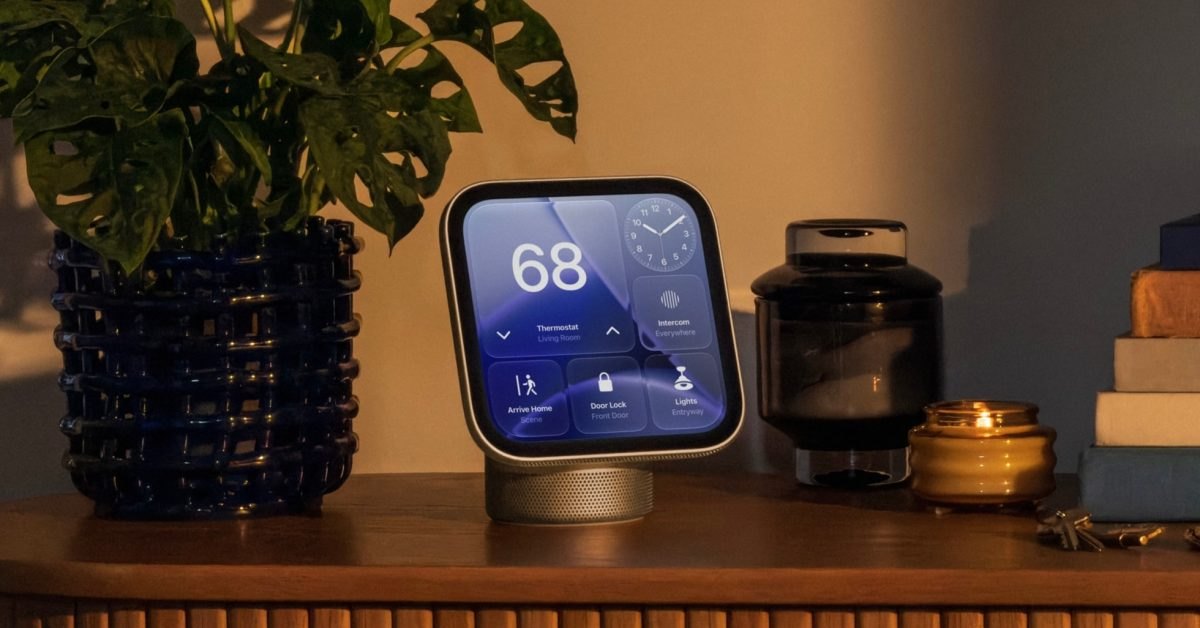
The software discovered in HomeView software 27.2 organizes camera functionality into four distinct modes: Off, Detect Activity, Stream, and Stream & Allow Recording. Selecting Off disables motion detection, streaming, and recording, preventing home members from viewing real-time video. Detect Activity allows HomeView to detect motion without streaming or recording, keeping real-time feeds blocked for home members. The Stream setting enables home members to watch real-time video feeds without saving recordings. Finally, Stream & Allow Recording enables both live streaming and video recording, allowing home members to stream in real-time and review saved recordings.
These camera modes can be configured to activate across three household presence states: when you are home, when you are away, or when you are asleep. Apple integrated distinct privacy safeguards into the hardware during active operation. An indicator light appears on the physical display whenever the security camera feature is in use, paired with an audible sound indicating that streaming or recording has begun. Furthermore, all registered members of the home receive an immediate digital notification on their personal devices whenever the camera starts capturing video.
Advertisement
Tech Pulse Daily
Get tomorrow's pulse first
Join engineers who read Tech Pulse before stand-up. Free, weekday mornings.
HomeView could double as a HomeKit security: why it matters now
Adding HomeKit security camera functionality materially improves the practical appeal and perceived value of the HomeView hardware for prospective buyers. Tabletop smart displays often struggle to prove their utility if limited to basic dashboard controls and voice interactions. By allowing the integrated camera to handle surveillance duties, Apple enables a single tabletop device to replace separate indoor security monitors. As noted in initial analysis, this expanded functionality could influence the perceived value of HomeView for anyone on the fence about purchasing one for their residence.
The feature also matters because Apple paired surveillance capabilities with first-rate privacy protections designed for shared domestic spaces. Indoor cameras frequently cause friction in shared living environments where individuals worry about unannounced monitoring by other household members. By delivering visible on-screen status lights, audible startup chimes, and automatic digital notifications to every home member, the software ensures video recording cannot occur covertly. These measures demonstrate an intentional engineering balance between smart home surveillance utility and personal privacy protection within domestic living areas.
HomeView could double as a HomeKit security: who is affected
Household members sharing a home with a HomeView unit are directly affected by the security camera features and their integrated safety protections. To address sensitive domestic privacy risks, Apple engineered a strict lockout directly into the platform. If any home members are detected inside the home, the security camera feature cannot be remotely activated from an external device. Instead, monitoring can only be switched on directly from the physical HomeView hardware, preventing domestic abusers from secretly spying on partners or housemates across the residence.
HomeKit administrators and family users also experience operational changes in how they manage indoor smart home surveillance setups. Administrators gain granular controls that automatically adjust camera behavior depending on whether occupants are away, home, or asleep. Concurrently, all household members maintain transparency because every member receives a notification when streaming or recording commences. Restricting remote camera activation while occupants are present ensures that individuals living in the home retain complete physical control over monitoring hardware located inside their shared living areas.
HomeView could double as a HomeKit security: what to watch
Smart home watchers should track upcoming iterations of HomeView software following version 27.2 to observe how Apple refines presence detection algorithms. A critical area to evaluate is how reliably the system identifies the physical presence of household members to enforce the remote activation lockout. Observers will also watch how effectively the scheduled modes transition when users switch between being home, away, or asleep. Testing the responsiveness of the on-screen indicator light and audible alerts will remain essential to verifying that camera activation remains obvious to everyone present.
Another crucial factor to watch is how Apple markets the dual-purpose camera functionality when HomeView officially reaches retail availability across markets. The inclusion of native streaming and recording options could disrupt third-party HomeKit security camera manufacturers who sell standalone indoor cameras. Furthermore, consumer advocates will assess whether Apple maintains the physical on-device activation requirement for occupied homes in the final production release. How Apple balances security convenience with domestic safety safeguards will determine whether privacy-conscious consumers welcome HomeView into their personal living spaces.
Developer Action Items
- ☐ Diff the official changelog for Apple / Framework 27.2 before you bump — APIs, defaults, and removed flags only.
- ☐ Install through the vendor's documented channel in staging; keep a one-command rollback and time-box the canary.
- ☐ Grep your repo for old flag names, lockfile pins, and plugin versions that the notes mark as breaking.
- ☐ Prefer the first patch cut over the day-zero tag unless you have a reason to be on the leading edge.
- ☐ If 9to5Mac did not name a region, plan, or SKU, screenshot the official availability line before you promise it to users.
HomeView could double as a HomeKit security FAQ
Can HomeView be used as a HomeKit security camera?
Settings discovered in HomeView software 27.2 show options to use the built-in camera for both streaming and recording.
What camera modes are available in HomeView software 27.2?
The software includes four distinct options: Off, Detect Activity, Stream, and Stream & Allow Recording.
Can someone remotely turn on the HomeView security camera while occupants are inside?
If any home members are currently in the home, remote activation is blocked, and the camera can only be enabled directly from the HomeView hardware itself.
How are occupants alerted when the HomeView camera is active?
An indicator light appears on the display, a startup sound plays, and members of the home receive an automated notification on their devices.
Sources

Author
Dillip Chowdary
Writes Tech Bytes coverage of AI, engineering, and the tools that actually ship. Editor of Tech Pulse Daily.
Related on Tech Bytes
Advertisement