A developer used Claude to build and ship Oriel – a free, native-feeling
Oriel 3.0 brings a native Dynamic Island to macOS, tracking Apple Music, Spotify, and Claude Code runs with under 60 MB of RAM on Apple Silicon and Intel.
By Dillip Chowdary • Nov 02, 2026 • Source: orielformac.pages.dev
An independent developer based in Portugal released Oriel 3.0, a free macOS Dynamic Island application built with Anthropic's Claude that transforms the hardware display notch into an interactive hub for media playback, developer tooling, notifications, and productivity widgets, as detailed in orielformac.pages.dev's report. Operating on macOS 14 or later across both Apple Silicon and Intel hardware, the utility wraps system events and background tasks into an expandable interface anchored to the top bezel. The release functions without subscriptions, advertisements, account requirements, or remote data telemetry, relying solely on optional Buy Me a Coffee donations from users.
This report examines how Oriel 3.0 implements Dynamic Island interface patterns on desktop hardware, detailing its integration with developer agents like Claude Code and Codex, its media controls, and its system resource footprint. The software targets Mac users seeking unified status tracking for streaming audio, system utilities, and live tasks directly from the menu bar. By bridging background terminal processes, messaging alerts, and media players into a single glanceable element, the app demonstrates how single-developer projects can leverage artificial intelligence models to ship native desktop software for modern Apple platforms.
A developer used Claude to build: what actually changed
Version 3.0 represents the software's largest architectural release to date, shifting from a fixed menu element into a dynamic shape that expands when triggered and collapses back into the notch bezel. The music subsystem now includes an enlarged player supporting synchronized, line-by-line lyric tracking for both Apple Music and Spotify, accompanied by animated album covers that render inside the island, the expanded player, and full-screen views. Playback controls and animated cover art also transfer directly to the macOS lock screen alongside incoming text message notifications, bringing parity with standard iOS notification presentation.
Beyond media playback, the update introduces Live Activities beside the notch, showing background status cards for downloads, screen recording, charging metrics, and AirPods battery readouts. Developers gain step-by-step visibility into running coding agents, including Claude Code and OpenAI Codex, accompanied by an alert badge whenever an agent halts for input. Communication alerts expand into contextual dropdowns displaying sender photos, inline replies, and meeting controls for Zoom, Microsoft Teams, and Google Meet with integrated mute and leave actions. The update also embeds a Pomodoro focus timer with an adjustable ruler, natural-language calendar scheduling, and drag-and-drop file staging directly inside the notch area.
A developer used Claude to build: how it works
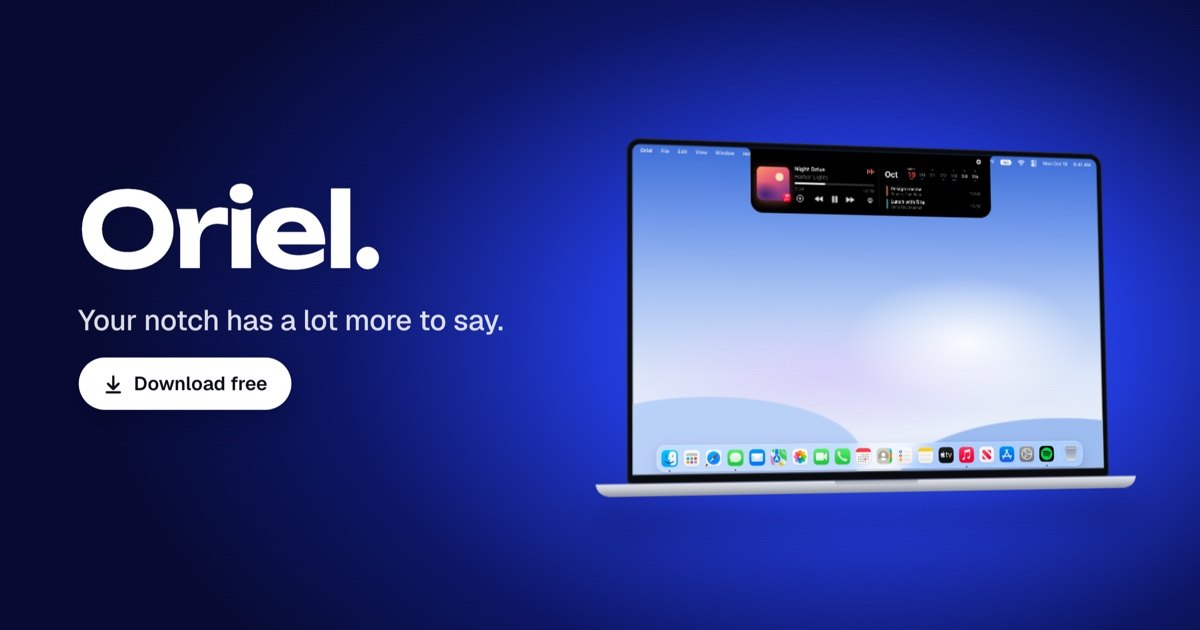
Oriel operates by monitoring system event hooks and local operating system APIs to project interface cards from the top edge of the screen. For music playback, it interfaces directly with macOS Now Playing sessions, extending deeper capabilities to Spotify via Spotify Connect to display current output targets, manage playlist saves, and mirror user queues. When monitoring developer tools, the app registers official agent hooks through a guided setup process within the application settings, translating terminal execution states into graphical activity cards that display live progress alongside a red exclamation point when the CLI agent requires user intervention or authorization.
The underlying software footprint remains compact, registering approximately 47 MB of RAM upon launch and hovering around 60 MB under sustained operational load before returning to baseline levels. CPU utilization registers below 1% while idle, measured on a MacBook Pro running macOS 27.2. All data parsing for messages, contact images, calendar events, and notes executes entirely on the local machine without external network transmission. To support devices lacking a display notch or external monitor configurations, the software automatically renders an adaptive floating pill interface that replicates the identical interaction suite, responding to pointer hover states while preserving global keyboard focus.
Advertisement
Tech Pulse Daily
Get tomorrow's pulse first
Join engineers who read Tech Pulse before stand-up. Free, weekday mornings.
A developer used Claude to build: why it matters now
The release highlights the expanding capability of AI-assisted software engineering, showing how an independent creator can assemble and ship a feature-dense utility targeting complex desktop operating system frameworks. Rather than serving merely as a basic audio control widget, the application integrates multiple distinct utility domains into a unified interface layer: audio streaming, native messaging, file staging, clipboard history, video call management, and artificial intelligence quota tracking. Consolidating these utilities eliminates the need for separate standalone menu bar apps that each consume independent memory overhead and display space.
Furthermore, the release addresses developer workflow fragmentation caused by background terminal agents. As command-line programming tools like Claude Code and OpenAI Codex become common fixtures in engineering environments, developers frequently lose track of terminal tasks running in hidden desktop spaces. Placing execution state indicators and alert badges directly in the display notch provides passive visibility without forcing context switches away from active windows. Additionally, the software provides a centralized dashboard monitoring remaining usage quotas and reset timestamps for Claude, Codex, Cursor, Gemini, and GitHub Copilot, giving engineers a single interface to manage multiple model allocations.
A developer used Claude to build: who is affected
The software directly serves Mac owners operating macOS 14 or later on either Apple Silicon or Intel architectures, whether their hardware features a physical display notch or a standard display bezel. Audio enthusiasts who utilize Apple Music or Spotify benefit from unified library controls, lyric synchronization, and output routing without keeping primary media windows visible. In addition, users who handle frequent incoming text messages can review photos, respond to message threads, and clear alerts from the island interface, with message statuses syncing automatically across associated Apple hardware so cleared notices vanish across connected devices.
Software engineers utilizing automated AI coding tools gain an ambient status display that tracks terminal executions while they attend to other workstation tasks. The software also impacts web users through an integrated browser-based widget builder, which allows community members to construct custom data cards using web values, custom colors, and system symbols without writing native Swift code. Once approved in the centralized gallery, these custom widgets become downloadable for the broader user base, enabling team members and independent developers to distribute custom notifications, countdown timers, and system health trackers across machines.
A developer used Claude to build: what to watch
Future developments center on community adoption and the expansion of the web-based widget gallery, which already hosts community submissions such as holiday countdowns and live weather metrics. As third-party developers submit new widget designs displaying data pulled from public endpoints, the platform's versatility beyond local system controls will depend on how efficiently the gallery review process scales. Continued updates will also need to track API adjustments across streaming services and web conferencing platforms to preserve call controls and queue manipulation features across changing third-party software versions.
On the developer tool front, the application's trajectory will closely follow updates to CLI coding agents. As Anthropic and OpenAI iterate on terminal interaction models, hook configurations and status reporting schemas will require routine maintenance within the app's settings panel. Observers will also track whether Apple adopts similar desktop Dynamic Island conventions natively in subsequent macOS updates, potentially shifting third-party notch utilities from niche experimental enhancements to baseline operating system patterns. For now, maintenance of the utility relies on community contributions through Buy Me a Coffee donations to support the Portugal-based creator.
Developer Action Items
- ☐ Diff the official changelog for OpenAI / Anthropic / Claude 3.0 before you bump — APIs, defaults, and removed flags only.
- ☐ Install through the vendor's documented channel in staging; keep a one-command rollback and time-box the canary.
- ☐ Grep your repo for old flag names, lockfile pins, and plugin versions that the notes mark as breaking.
- ☐ Prefer the first patch cut over the day-zero tag unless you have a reason to be on the leading edge.
- ☐ If HN Claude/Codex/Fable did not name a region, plan, or SKU, screenshot the official availability line before you promise it to users.
A developer used Claude to build FAQ
Which Mac models and operating system versions are compatible with Oriel 3.0?
Oriel 3.0 runs on macOS 14 or later across both Apple Silicon and Intel machines, operating with or without a physical display notch.
How much system memory and processing power does Oriel consume?
The application uses under 1% CPU at rest, starting at roughly 47 MB of RAM and reaching approximately 60 MB during heavy usage before dropping back down.
Why does the app request Full Disk Access during setup?
Full Disk Access is required strictly to display incoming text message photos, render group chat pictures, manage lock screen texts, and sync read states across devices.
How does Oriel track background tasks from Claude Code and OpenAI Codex?
Clicking Set Up in the application settings installs official hooks that allow Oriel to display live agent activity cards and surface a red alert mark when user input is needed.
Sources

Author
Dillip Chowdary
Writes Tech Bytes coverage of AI, engineering, and the tools that actually ship. Editor of Tech Pulse Daily.
Related on Tech Bytes
Advertisement