Logitech Yeti 2 Review: An All-In-One Studio Setup
Logitech launched the $160 Yeti 2 microphone with an onboard display, active noise suppression, and USB-C connectivity to succeed the iconic 2009 Blue model.
By Dillip Chowdary • Nov 15, 2026 • Source: Wired

Logitech launched the Yeti 2, updating the Blue Yeti microphone originally released in 2009. The standalone USB microphone retails for $160 at Amazon, B&H, and Logitech, as detailed in Wired's report. The unit upgrades from legacy Mini-USB to USB-C while adding active onboard audio processing for real-time monitoring, gain control, and background noise removal.
This analysis details the hardware interface, automated signal processing, polar pattern options, acoustic performance, and mounting ergonomics of the condenser unit. The microphone caters to streamers, podcasters, and remote workers who want polished vocal sound without configuring complex external mixing software or interfaces.
01Hardware screen and physical dial controls
The front of the microphone features an integrated screen and physical dial that handle on-the-fly adjustments directly on the chassis. Users can adjust gain, switch post-processing modes, and configure sound profiles without opening companion desktop applications. The primary display shows an input volume graph reflecting the gain-adjusted signal entering the computer.
The display can show a volume histogram over time, directional input indicators, or an animated pixel-art Yeti avatar reflecting current levels. The character looks confused when speech is quiet, happy during normal volume, and alarmed when audio clips. Logitech G Hub software allows swapping the avatar for a dragon, flower, frog, or custom images.
The included desk stand uses two rubber grommets and a felt underside panel to isolate vibrations from keyboard strikes. A bottom threaded hole fits boom arms, though flipping the display 180 degrees places the adjustment knob and proximity sensor above the screen. A top-mounted headphone jack also creates awkward cable routing when suspended overhead.
02Automated gain and proximity noise suppression
The microphone manages gain automatically using a built-in proximity sensor to measure speaker distance and normalize vocal volume with zero delay. Voice levels remain consistent across varying distances, requiring virtually no manual intervention during sessions. At longer distances, however, audio exhibits subtle room echo and slight midrange frequency loss.
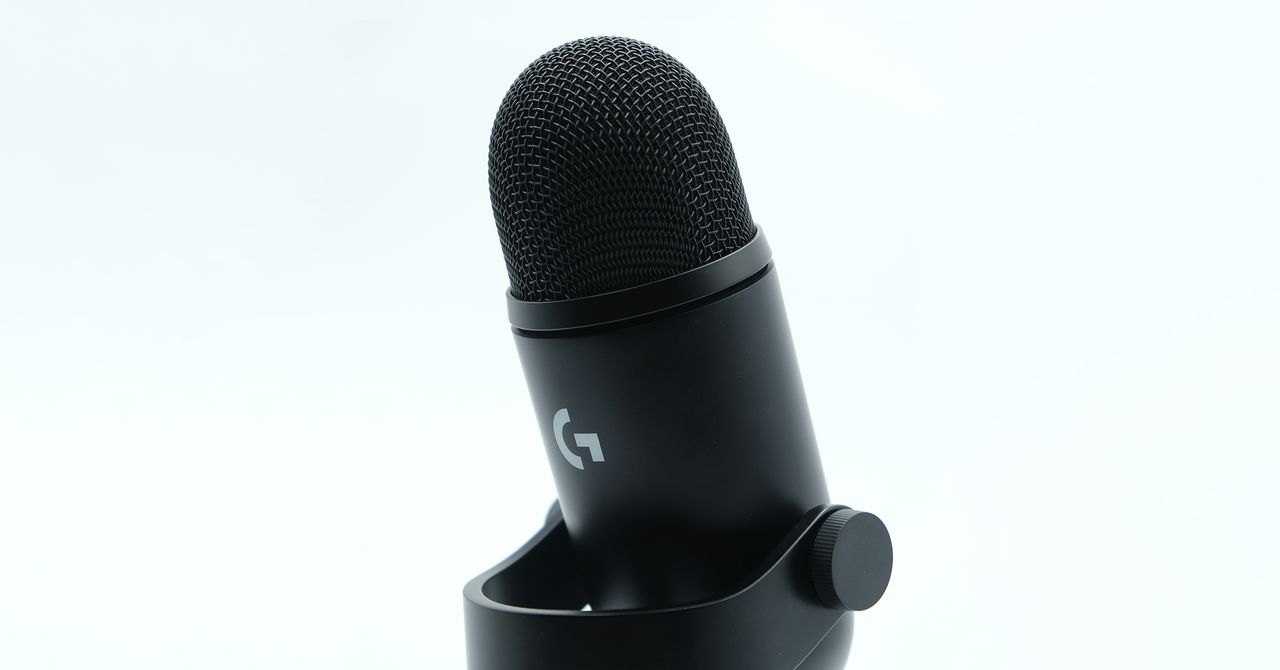
The onboard de-noiser provides four intensity settings ranging from none to maximum to suppress unwanted environmental noise. At maximum strength, the algorithm completely removes clatter from an unpadded, all-aluminum mechanical keyboard placed directly in front of the capsules. Lower levels eliminate distant hums, though the highest tier introduces a slightly muted acoustic feel.
Deeper parameter adjustments live inside Logitech G Hub, which details how each setting functions and offers granular intensity sliders. Standard tasks bypass the software entirely since the physical dial cycles through five built-in equalization presets. Active processing filters run on the microphone hardware itself, ensuring instant response without taxing computer processing power.
Advertisement
Tech Pulse Daily
Get tomorrow's pulse first
Join engineers who read Tech Pulse before stand-up. Free, weekday mornings.
03Three-capsule array and directional pickup patterns
The internal acoustic architecture relies on three directional condenser capsules arranged inside a simple chassis that disassembles in few steps. Two capsules face forward at 45-degree angles, while a third capsule points backward. This physical arrangement allows onboard firmware to manipulate sensitivity and generate distinct pickup patterns for different recording scenarios.
Pattern controls include eight preset modes, such as three forward-facing options labeled standard, focused, and hyper-focused. Creators can also switch to an omnidirectional 360-degree mode for roundtable discussions or an interview pattern listening from front and back. These configurations adjust relative capsule sensitivity to capture voices while minimizing off-axis room noise.
A stereo pickup mode separates left and right channels across the front listening hemisphere using the two forward-angled capsules. Because neither capsule points directly sideways, the stereo field cannot capture 360-degree spatial audio. High-pitched or loud transient noises like handclaps register equally across both channels, limiting performance for specialized binaural or ASMR applications.
04Acoustic signature and baseline noise floor
The core condenser capsules deliver a warm, midrange-forward acoustic signature very similar to the original 2009 model. The default sound profile features slightly less bass presence than its predecessor, though the five onboard equalization presets allow minor adjustments. Vocal recordings remain clear and intelligible across typical spoken-word applications right out of the box.
Even with all active digital processing turned off, the microphone reveals a tiny amount of baseline noise in raw recordings. Experimenting with equalizer curves confirms this faint noise floor is inherent to the analog hardware profile. While digital processing masks this artifact during normal speech, unprocessed audio lacks the dead silence of higher-end studio gear.
The device relies exclusively on a digital USB-C connection, omitting an analog XLR output for external preamps or studio mixers. This configuration limits the microphone to standalone computer recording without access to dedicated analog mixing hardware. For advanced studio setups, the hard ceiling on unprocessed audio quality makes dedicated XLR equipment a more flexible long-term investment.
05Live streaming setup and pricing economics
Live streamers, competitive gamers, and remote workers conducting daily video calls gain the most value from the automated signal pipeline. Zero-latency processing ensures that dynamic compression and noise reduction apply cleanly during live broadcasts. Creators without audio engineering expertise can produce polished vocal streams without tweaking third-party software plugins.
Professional audio engineers who routinely edit raw audio in post-production will find the USB-only architecture somewhat restrictive. The active onboard tools prioritize instant clarity and convenience over granular mixing control and raw acoustic headroom. For complex studio environments requiring analog routing, dedicated XLR microphones remain the preferred standard.
Pricing stands at $160, representing a modest $20 increase over the original $140 Blue Yeti that still uses Mini-USB ports. That twenty-dollar delta brings modern USB-C connectivity, an informative screen, automatic gain, and effective onboard noise processing. For creators seeking an all-in-one desktop recording solution, the hardware upgrades justify the purchase price.
Logitech Yeti 2 Review FAQ
How much does the Logitech Yeti 2 cost compared to the original?
The Logitech Yeti 2 retails for $160 at Amazon, Logitech, and B&H. This represents a $20 price difference compared to the standard original Blue Yeti, which sells for $140.
Does the Logitech Yeti 2 require desktop software to operate?
No, most functions operate without software thanks to the onboard screen, physical dial, and automatic processing. Deep adjustments are optional through the Logitech G Hub desktop application.
Can the Logitech Yeti 2 connect via XLR to audio interfaces?
No, the Yeti 2 lacks an analog XLR connection and relies solely on a digital USB-C connection to transmit audio.
How does the automatic gain control work on the Yeti 2?
The microphone uses an integrated proximity sensor to gauge user distance. It normalizes voice levels automatically across distances without requiring manual gain tweaks.
Sources

Author
Dillip Chowdary
Writes Tech Bytes coverage of AI, engineering, and the tools that actually ship. Editor of Tech Pulse Daily.
Related on Tech Bytes
Advertisement