Meta’s Muse AI can create custom ‘spaces’ for the version of the app you
Meta is rolling out spaces in its Muse app, letting users build custom interactive hubs that connect to Gmail and Notion to update dates and prices.
By Dillip Chowdary • Nov 07, 2026 • Source: The Verge
Meta launched a feature called spaces within its Muse AI assistant, allowing users to build customized, app-like experiences directly in the application. As reported in The Verge's report, the new capability converts natural-language prompts into dedicated software views like shopping hubs, school dashboards, trivia games, and music trackers. Rather than relying on standard chat feeds, the system provides modular workspaces that continuously pull live updates from connected outside applications.
This analysis details how Meta's new interface operates, how background synchronization functions, and what the integration of advanced memory models means for daily organization. The report is designed for professionals and active technology users evaluating how artificial intelligence tools are evolving beyond static chat logs into dynamic personal dashboards. Readers will find specifics on app integrations, workspace scheduling controls, and planned collaboration features rolling out across the Muse ecosystem.
Meta’s Muse AI can create custom ‘spaces’: what actually changed
The release of spaces replaces traditional chronological chat streams with dedicated, interactive application environments inside the Muse app. Users generate a new space simply by describing what they need, prompting the AI assistant to assemble tailored interfaces such as school dashboards, music trackers, trivia games, or shopping hubs. Rather than viewing static text, individuals can interact directly with elements inside their spaces by checking items off lists, adding notes, and making real-time edits to the generated layouts without submitting separate prompt requests.
Meta also introduced advanced capabilities derived from its Muse Wonder AI model into both the Muse app and the Meta AI chatbot. Known as Active Memory and Active Focus, these features help the assistant determine when past conversational information becomes relevant during ongoing interactions. This model upgrade enables Muse to track user objectives more effectively across multiple sessions. Instead of treating each interaction as a disconnected exchange, the platform retains context and aligns background updates with the specific long-term goals established by the user.
Meta’s Muse AI can create custom ‘spaces’: how it works
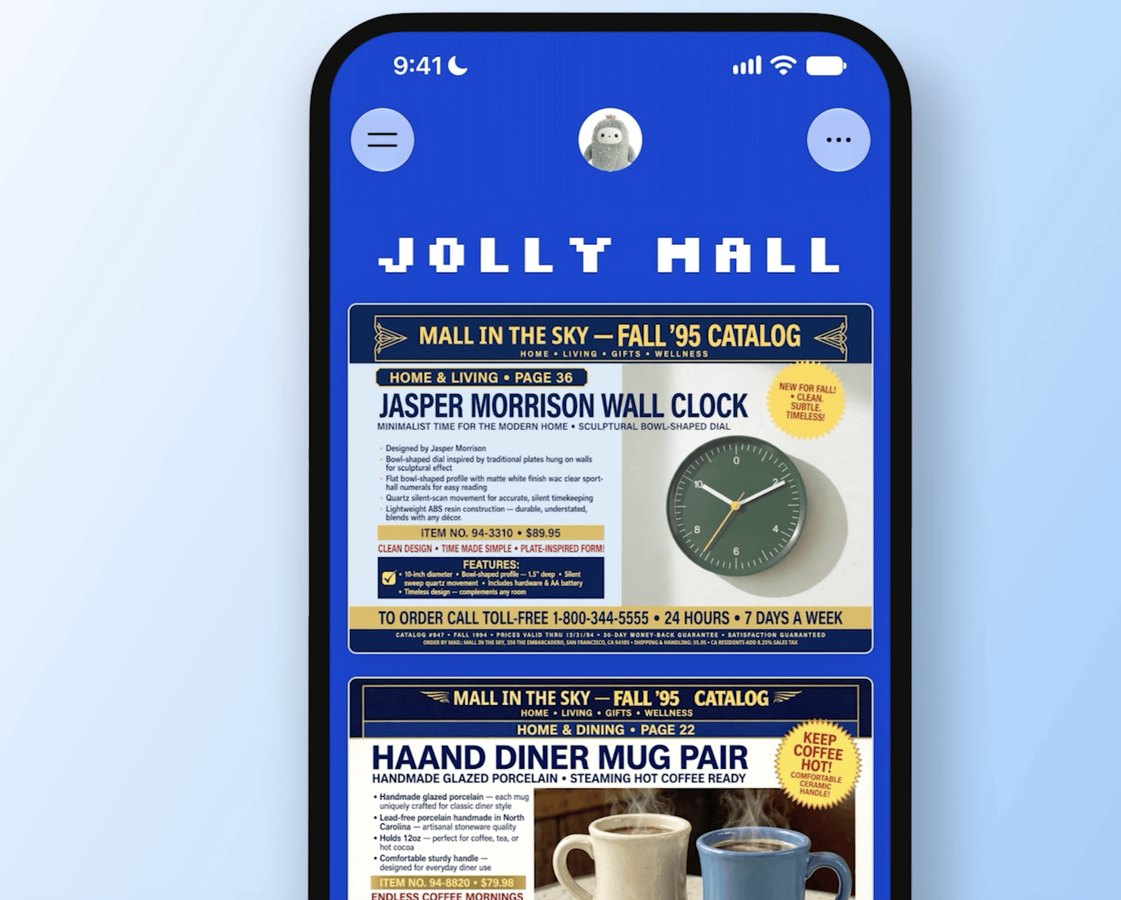
Creating a space starts with a natural-language description entered into the assistant, which builds the requested view automatically. To unlock dynamic updates, users can link external services such as Gmail, Google Calendar, OpenTable, Notion, and other supported applications to Muse. Once connected, the assistant continuously pulls data from these platforms in the background. If a reservation changes or an email arrives, Muse automatically refreshes pricing, dates, and related details within the active space, eliminating the need to refresh or copy data manually across applications.
Interface placement is fully customizable, allowing users to dock spaces in the sidebar, position them in the main tab, or schedule when they appear. Meta designed this scheduling feature so users can swap environments based on their routine: “For example, keep your weekly planner up front during the workweek, then swap it for your weekend plans on Saturday,” Meta says. Combined with the recently released voice mode, these placement options give people flexible ways to access, view, and organize their custom dashboards throughout their daily schedules.
Advertisement
Tech Pulse Daily
Get tomorrow's pulse first
Join engineers who read Tech Pulse before stand-up. Free, weekday mornings.
Meta’s Muse AI can create custom ‘spaces’: why it matters
The addition of spaces addresses a core limitation of standard conversational AI tools: the temporary, fleeting nature of linear message threads. By allowing users to interact directly with functional elements like checklists and editable notes, Meta transforms conversational outputs into lasting productivity dashboards. Everyday users can build tailored utilities without writing code or purchasing standalone single-purpose software. This transition turns the assistant into a central operational hub capable of organizing everyday activities such as student course assignments, retail shopping lists, and recreational trivia games.
The deployment of Active Memory and Active Focus from the Muse Wonder model further elevates the system's practical value. Traditional chatbots require people to restate preferences or manually supply relevant background details during every new conversation. By automatically recognizing when historical facts apply to current tasks, Muse keeps connected data from Notion, OpenTable, and Google Calendar aligned with user goals. The assistant manages information asynchronously, ensuring that changing appointment dates and product prices remain current without requiring continuous manual prompting from the user.
Meta’s Muse AI can create custom ‘spaces’: who is affected
The rollout directly affects all Muse users, who can now access custom spaces across the entire platform. Students can consolidate academic coursework into single dashboards, while music fans and shoppers can set up dedicated tracking tools for entertainment and product pricing without paying extra fees. Because Meta is rolling the feature out broadly across the user base rather than restricting it to closed beta tiers, everyday consumers gain immediate access to customized software creation directly inside their existing mobile and desktop application interfaces.
Users of the Meta AI chatbot also gain advantages, as the underlying Active Memory and Active Focus features extend beyond Muse to enhance the wider chatbot experience. People managing multiple external tools like Gmail, Google Calendar, and Notion benefit from an assistant that correlates schedules with ongoing tasks. However, individuals must grant external app permissions to enable background updates, which requires trusting Meta to continuously access personal communication records, reservation services, and productivity databases to maintain accurate dashboard information over time.
Meta’s Muse AI can create custom ‘spaces’: what to watch
A key factor to monitor as spaces deploy is how smoothly the platform handles background synchronization with connected services like OpenTable, Notion, Google Calendar, and Gmail. While continuous updates promise current pricing and schedule changes, real-world reliability depends on how cleanly the AI assistant reconciles incoming data without user oversight. Observing whether background processing maintains accurate records during sudden calendar shifts or retail price adjustments will indicate whether custom spaces can genuinely replace standalone productivity and tracking applications for daily consumer organization.
Another important development involves Meta's plans for collaboration and sharing. Meta has confirmed that it is exploring methods to allow users to share their spaces and collaborate with other individuals inside the app. If launched, shared spaces could transform the tool from an isolated personal assistant into a collaborative workspace for teams, families, and project partners. Tracking how Meta manages shared editing permissions, personal privacy boundaries, and third-party app access will determine how effectively the feature competes with established group productivity platforms.
Developer Action Items
- ☐ Diff the official changelog for Google / Meta before you bump — APIs, defaults, and removed flags only.
- ☐ Install through the vendor's documented channel in staging; keep a one-command rollback and time-box the canary.
- ☐ Grep your repo for old flag names, lockfile pins, and plugin versions that the notes mark as breaking.
- ☐ Prefer the first patch cut over the day-zero tag unless you have a reason to be on the leading edge.
- ☐ If The Verge did not name a region, plan, or SKU, screenshot the official availability line before you promise it to users.
Meta’s Muse AI can create custom ‘spaces’ FAQ
What are spaces in Meta's Muse AI assistant?
Spaces are customizable, app-like interfaces created within Muse from descriptive prompts, such as shopping hubs, school dashboards, music trackers, and trivia games. Users can interact directly with elements inside them by checking off items, adding notes, and editing information.
Which external apps can connect to Muse spaces?
Users can connect outside services including Gmail, Google Calendar, OpenTable, and Notion. Muse continuously pulls data from these connected services in the background to automatically update dates, pricing, and other details.
What are Active Memory and Active Focus in Muse?
Active Memory and Active Focus are capabilities originating from Meta's Muse Wonder AI model that have been added to the Muse app and Meta AI chatbot. They allow the assistant to recall relevant past information during conversations and improve its ability to work toward user goals.
Can you share Muse spaces with other users?
Spaces currently function for individual users, but Meta confirmed it is actively exploring ways to let people share and collaborate on spaces with others.
Sources

Author
Dillip Chowdary
Writes Tech Bytes coverage of AI, engineering, and the tools that actually ship. Editor of Tech Pulse Daily.
Related on Tech Bytes
Advertisement