Xbox overhauls its PC, web, and cloud apps with a faster design
Microsoft redesigned its Xbox PC app to launch up to 60 percent faster, introducing streamlined controller navigation and faster Game Pass loading.
By Dillip Chowdary • Nov 07, 2026 • Source: The Verge
Microsoft overhauled its Xbox PC application, introducing an architectural update that launches up to 60 percent faster than previous builds. The redesigned software aligns with synchronized upgrades rolling out across Xbox Cloud Gaming on web browsers, smart TVs, and VR headsets. According to The Verge's report, Microsoft restructured navigation layers to eliminate input friction across Windows devices.
This report details the performance gains, interface updates, social integrations, and multi-device cloud features included in Microsoft's latest software deployment. It is written for PC gamers, Game Pass subscribers, handheld owners, and cloud streaming users. By examining the updated software stack, this analysis explains what arrived today, how to join the preview, and what features will roll out next.
Xbox overhauls its PC: the announcement
The official announcement focuses on performance enhancements addressing long-standing speed issues across the Windows desktop client. Jason Beaumont, vice president of Xbox experiences at Microsoft, confirmed that the updated application now launches up to 60 percent faster than earlier versions. System telemetry shows that major storefront and navigation pages, including Home, Store, and Game Pass, load up to 50 percent faster. In addition, in-app secondary windows open up to 65 percent faster, significantly reducing wait times during daily system navigation.
Microsoft timed this desktop reveal alongside coordinated interface revisions for Xbox Cloud Gaming across web browsers, smart television displays, and VR headsets. Registered Xbox Insiders can begin testing the refreshed PC application immediately, while companion cloud gaming web interfaces deploy gradually over the next few weeks. Company leadership explained that these updates are part of broader efforts to make Xbox faster, simpler, and more familiar wherever users play. The redesign establishes visual consistency across hardware categories, whether gamers use controllers or mice.
What actually changed with Xbox overhauls its PC
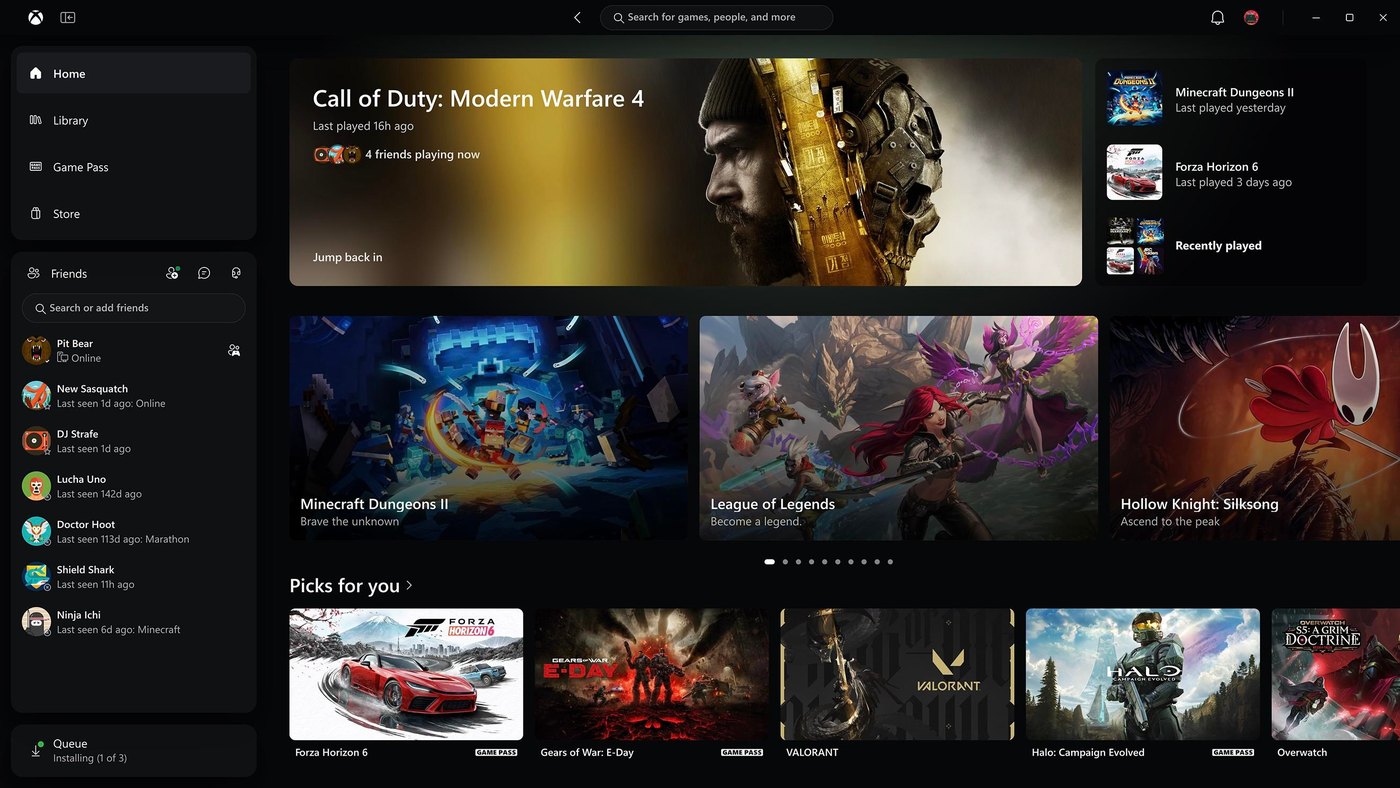
Under the hood, the updated PC app feels noticeably less like a sluggish web wrapper, combining native interface elements with web components for smoother overall responsiveness. Microsoft refreshed game card tiles, home sections, and general settings screens while updating dashboard animations to mirror the fluidity of an Xbox console. Navigational pathways were restructured to prevent input errors, ensuring the search interface no longer pops up when moving between sections. In the games library, newly updated organizational filters help users sort installed titles with greater precision.
Social features received prominent placement, moving friend lists directly to the main landing screen alongside quick buttons to launch chats or join voice parties without digging through menus. Concurrently, the web version of Xbox Cloud Gaming gained a dedicated desktop mode designed to utilize larger computer displays effectively. Web users can also toggle between dark and light color modes, or select from five new high-contrast options introduced to expand accessibility support. A new library tab highlights cloud titles across personal purchases and Game Pass.
Advertisement
Tech Pulse Daily
Get tomorrow's pulse first
Join engineers who read Tech Pulse before stand-up. Free, weekday mornings.
Who should care about Xbox overhauls its PC
Handheld device users represent a primary group benefiting from this overhaul, particularly after Microsoft launched its Xbox Ally portable hardware last year. The original PC application struggled on compact screens because it felt like clicking a desktop mouse rather than operating a dedicated gaming console. The revised layout features simplified navigation tailored specifically for physical controllers, making movement through menus and libraries intuitive and responsive. Players operating handheld PCs will appreciate that search prompts no longer obstruct navigation, allowing thumbsticks to browse game catalogs smoothly without awkward pointer emulation.
Desktop computer gamers and cloud gaming subscribers also gain substantial quality-of-life upgrades from this release. PC enthusiasts managing dozens of local installations can now utilize improved library filters to organize titles efficiently while enjoying 50 percent faster store and home screen load times. Meanwhile, web and smart TV users gain an interface that reduces navigation complexity and mirrors the desktop client's structure. Those who rely on accessibility features will benefit from five new high-contrast options, ensuring players with distinct visual requirements can comfortably read menus and manage sessions.
How to try Xbox overhauls its PC
Enrolled Xbox Insiders can access the redesigned PC application today through standard preview channels on Windows. Testing the updated client requires opening the Xbox Insider Hub app on a Windows PC, navigating to preview enrollments, and joining the PC Gaming flight. Once registration is active, the Microsoft Store delivers the updated package directly to the computer, upgrading existing application files automatically. Participants can immediately test faster startup speeds, try updated library filters, and experience controller-focused navigation across their personal game collections without performing manual file installations.
Players interested in companion web updates will see the refreshed Xbox Cloud Gaming interface roll out across internet browsers over the next few weeks. Access does not require enrolling in specific software flights, as Microsoft is deploying browser changes directly to the streaming portal. Users can sign in to test desktop display mode, preview the cloud library tab, and switch between light, dark, and high-contrast color palettes. Updated cloud gaming apps for supported smart televisions and VR headsets will follow closely behind as platform rollouts expand.
What to watch after Xbox overhauls its PC
Following the primary application overhaul, attention shifts to how Microsoft updates surrounding Windows gaming software, notably the Game Bar interface on handheld devices. Because the desktop app received modern styling and controller optimization, the existing Game Bar overlay now feels visibly out of place during handheld use. Microsoft is actively preparing updates for Game Bar over the coming months to match this newer Xbox PC aesthetic. Handheld players should monitor future Windows updates to observe how system overlays, performance monitoring tools, and quick settings align with the cleaner presentation.
Another key element to track is how Microsoft customizes the experience across smart TVs and VR headsets while preserving core operational consistency. Jason Beaumont noted that each display environment requires dedicated adjustments, meaning TV and headset interfaces will not be exact clones of the PC application. However, Microsoft intends to keep core tasks familiar everywhere, specifically finding games, verifying playable titles, and jumping into gameplay rapidly. Tracking user feedback as these cloud interfaces reach broader audiences over the next few weeks will reveal how effectively Microsoft standardizes its gaming platform across varied hardware.
Developer Action Items
- ☐ Diff the official changelog for Microsoft / Windows before you bump — APIs, defaults, and removed flags only.
- ☐ Install through the vendor's documented channel in staging; keep a one-command rollback and time-box the canary.
- ☐ Grep your repo for old flag names, lockfile pins, and plugin versions that the notes mark as breaking.
- ☐ Prefer the first patch cut over the day-zero tag unless you have a reason to be on the leading edge.
- ☐ If The Verge did not name a region, plan, or SKU, screenshot the official availability line before you promise it to users.
Xbox overhauls its PC FAQ
How much faster is the updated Xbox PC app?
The application launches up to 60 percent faster, while Home, Store, and Game Pass load up to 50 percent faster. In-app secondary windows also open up to 65 percent faster.
Who can test the redesigned Xbox PC app today?
Registered Xbox Insiders can test the new PC app today by joining the PC Gaming preview flight in the Xbox Insider Hub on Windows.
What features were added to the Xbox Cloud Gaming web experience?
The web version adds a desktop mode for larger screens, light and dark themes, five high-contrast accessibility options, and a new library tab for cloud games.
Sources

Author
Dillip Chowdary
Writes Tech Bytes coverage of AI, engineering, and the tools that actually ship. Editor of Tech Pulse Daily.
Related on Tech Bytes
Advertisement