Windows 11 tries new shortcuts for Xbox gaming mode and search
Microsoft launched Windows 11 Beta Build 26220.9836 with new Xbox quick settings alongside an overhauled system search featuring connected phone call controls.
By Dillip Chowdary • Nov 01, 2026 • Source: The Verge
Microsoft released Beta Build 26220.9836 and Experimental Build 26340.9843 for Windows 11 Insiders, introducing quick settings shortcuts inside Xbox gaming mode alongside a major functional overhaul to system search. As detailed in The Verge's report, the preview software aims to reduce interruptions for computer gamers while transforming the primary search field into an interactive tool. Rather than returning basic file names or web queries, the search interface executes immediate system adjustments, controls connected phone functions, and renders structured data cards directly on screen.
This report examines the concrete additions across both preview builds, detailing how the operating system handles gaming sessions, processes system actions, and connects with mobile devices. The release targets registered Windows Insiders evaluating preview builds, providing gamers with instant controls for essential connections alongside productivity upgrades for desktop navigation. Readers testing either build channel will find measurable changes in how Windows 11 manages wireless hardware, responds to volume commands, surfaces document metadata, and gathers algorithmic training inputs through interactive rating icons.
Windows 11 tries new shortcuts for Xbox: what actually changed
The core modification in these preview builds is the addition of quick settings within Xbox gaming mode that operate without requiring players to exit active titles. In previous software versions, adjusting basic system or network preferences forced players to minimize active sessions to reach standard desktop menus. Microsoft updated this experience by placing quick settings shortcuts directly into gaming mode, giving players instant access to Bluetooth device toggles, Wi-Fi network preferences, and system power controls while games remain active on display.
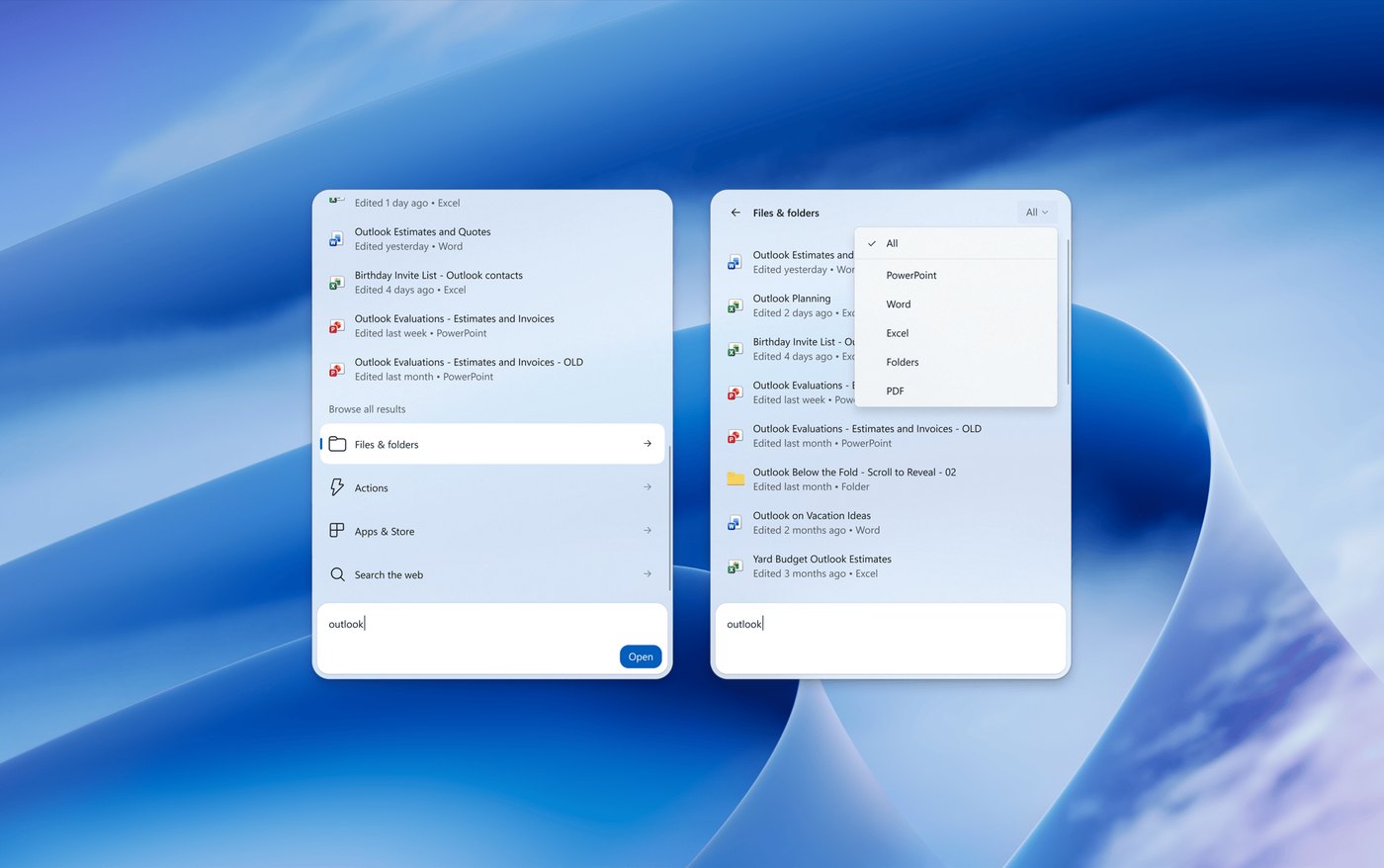
Beyond gaming mode upgrades, Microsoft implemented comprehensive enhancements to the integrated Windows search utility across both testing branches. Users can now filter search queries into distinct categories for files, system actions, or web results rather than sifting through unorganized output. Individual file results display detailed metadata, revealing the author who created the document as well as the timestamp when the file was last modified. These contextual indicators help users identify relevant assets quickly without inspecting file properties in separate explorer windows.
Windows 11 tries new shortcuts for Xbox: how it works
Inside Xbox gaming interface, new shortcuts function as an integrated overlay that surfaces hardware toggles directly over running applications. When a player activates the quick settings menu, the system displays responsive toggles for Bluetooth connectivity, wireless internet settings, and system power states. This setup allows gamers to manage peripheral pairings, switch active networks, or alter power configurations without interrupting graphic rendering or minimizing game windows. The integration maintains session stability and avoids resolution resets by executing commands through dedicated system hooks.
The revised search tool operates by turning text entries into executable instructions across local and connected hardware. Entering queries into the search bar permits users to manipulate display brightness sliders or change system volume without opening settings panels. The search box integrates with paired phones, enabling users to perform actions such as making phone calls directly from search results. The interface also pulls in visual charts for stock prices and weather forecasts, with inline thumbs-up and thumbs-down icons to help search improve over time.
Advertisement
Tech Pulse Daily
Get tomorrow's pulse first
Join engineers who read Tech Pulse before stand-up. Free, weekday mornings.
Windows 11 tries new shortcuts for Xbox: why it matters now
Integrating quick settings into Xbox mode solves an ongoing usability hurdle for desktop gaming environments. Full-screen computer games regularly suffer from visual hitches, audio desynchronization, or application crashes when users toggle to the taskbar to handle network issues or reconnect peripheral accessories. Providing native controls for Bluetooth, Wi-Fi, and power management directly within the gaming interface preserves session continuity. Players can address connection drops, pair wireless controllers, or shut down machines without sacrificing operational stability or losing unsaved gameplay progress during sessions.
Expanding system search capabilities transforms the desktop bar from a basic file directory lookup into a centralized command hub. Rather than launching dedicated web browsers or navigating deeply nested settings panels, users can check market charts, inspect weather data, and tweak system brightness directly from their keyboard. The integration with connected mobile devices shortens routine tasks like dialing phone contacts. Meanwhile, inline rating buttons provide an active channel for user feedback, ensuring search results and action suggestions adapt to individual patterns over time.
Windows 11 tries new shortcuts for Xbox: who is affected
The immediate deployment of these features affects participants enrolled in the Windows Insider Program who install Beta Build 26220.9836 or Experimental Build 26340.9843. PC gamers who frequently utilize Xbox gaming features will experience noticeable functional changes, especially those operating wireless peripherals or switching between network routers during play sessions. Users running standard, general-availability editions of Windows 11 are not affected by this rollout, as updated Xbox toggles and search enhancements remain restricted to preview builds while initial telemetry data is evaluated.
Beyond gamers, productivity-focused users who integrate mobile handsets with Windows 11 will notice interface changes within the central search environment. Individuals managing substantial document archives will benefit from author attribution and modification timestamps appearing alongside file results. Users who execute routine system adjustments or dial contacts from their computers will see workflow improvements, provided their connected phone is linked with the operating system. Those preferring traditional search layouts must adapt to structured categories separating actions, files, and live web search entries.
Windows 11 tries new shortcuts for Xbox: what to watch
As testing continues across both preview branches, observers should watch how Microsoft refines query accuracy based on inline feedback submissions. The inclusion of thumbs-up and thumbs-down rating buttons allows engineering teams to gather direct telemetry regarding whether search filters, hardware actions, and dynamic forecast cards meet user expectations. Subsequent preview releases will reveal whether these feedback mechanisms lead to algorithmic adjustments in search rankings, or whether Microsoft expands executable commands to encompass additional connected smartphone functions and peripheral hardware settings beyond controls.
Another crucial aspect to track is the eventual graduation path from preview channels into public stable builds of Windows 11. Because Microsoft distributed these updates across Beta Build 26220.9836 and Experimental Build 26340.9843, development teams are comparing stability metrics across two distinct testing environments. The progression toward a public release will depend on how reliably the Xbox gaming overlay handles hardware power and wireless states without crashing graphics drivers, alongside user satisfaction with phone integration and system action triggers in search.
Developer Action Items
- ☐ Diff the official changelog for Microsoft / Windows 26220.9836 before you bump — APIs, defaults, and removed flags only.
- ☐ Install through the vendor's documented channel in staging; keep a one-command rollback and time-box the canary.
- ☐ Grep your repo for old flag names, lockfile pins, and plugin versions that the notes mark as breaking.
- ☐ Prefer the first patch cut over the day-zero tag unless you have a reason to be on the leading edge.
- ☐ If The Verge did not name a region, plan, or SKU, screenshot the official availability line before you promise it to users.
Windows 11 tries new shortcuts for Xbox FAQ
Which Windows 11 Insider preview builds include these new features?
The features are available in Beta Build 26220.9836 and Experimental Build 26340.9843 for registered Windows Insiders.
What settings can players adjust without exiting Xbox gaming mode?
Users can adjust Bluetooth connections, Wi-Fi networks, and system power settings directly from quick settings shortcuts without leaving their game.
What actions can be performed directly from the updated Windows 11 search bar?
The search bar can change screen brightness, adjust volume levels, and trigger actions on a connected phone, including placing outbound calls.
How do users train the new Windows 11 search feature?
Users can click inline thumbs-up or thumbs-down icons on search results to provide feedback and help the algorithm improve accuracy over time.
Sources

Author
Dillip Chowdary
Writes Tech Bytes coverage of AI, engineering, and the tools that actually ship. Editor of Tech Pulse Daily.
Related on Tech Bytes
Advertisement