Yelp Combines Native and Server-Driven UI for Its AI Assistant
Yelp adopted a hybrid UI for its AI Assistant, combining native input with the CHAOS framework to update chat flows across platforms without app releases.
By Dillip Chowdary • Nov 07, 2026 • Source: InfoQ
Yelp adopted a hybrid user interface architecture for its AI Assistant by pairing native mobile controls with server-driven conversation rendering, according to InfoQ's report. The Yelp Assistant originally launched on iOS in 2024 to assist users with creating project requests for local service professionals, and has since expanded to answer business questions and execute actions like reservations, appointments, and food orders. To accelerate interface updates across platforms without waiting for app store releases, Yelp integrated its existing CHAOS framework, short for Content Hosting Architecture with Optimization Strategies, to render the chat conversation area while keeping navigation elements and message input native.
This breakdown examines how Yelp engineered the split between native controls and server-driven presentation, the technical mechanics of its event-driven data model, and how the architecture is maintained across platforms. The analysis is aimed at mobile architects, full-stack engineers, and product teams building conversational AI experiences who must balance rapid UI iteration against the responsiveness of client-side input handling. By separating view configuration from dynamic message data, Yelp established an operational pattern that resolves delivery delays while setting the foundation for future conversational features.
Yelp Combines Native and Server-Driven UI: what actually changed
The structural shift centers on dividing responsibilities between the client application and backend layout servers rather than building a purely native or purely server-driven interface. Yelp’s existing CHAOS framework, which already supported web, iOS, and Android clients, lacked built-in capabilities required by the Assistant, specifically native text input fields and direct network request orchestration. Extending the framework to support those components natively would have introduced significant delivery delays for the product team.
To meet delivery timelines without sacrificing cross-platform agility, Yelp implemented a hybrid boundary. Services Tech Lead Daniel Andrade Groppe explained that the team kept navigation and message input native while using CHAOS exclusively to render the conversation stream. This decision prevented extensive framework rewrites, preserved standard keyboard responsiveness and platform-native navigation transitions, and allowed backend teams to update conversation layouts without submitting new binary releases through mobile application stores.
Yelp Combines Native and Server-Driven UI: how it works
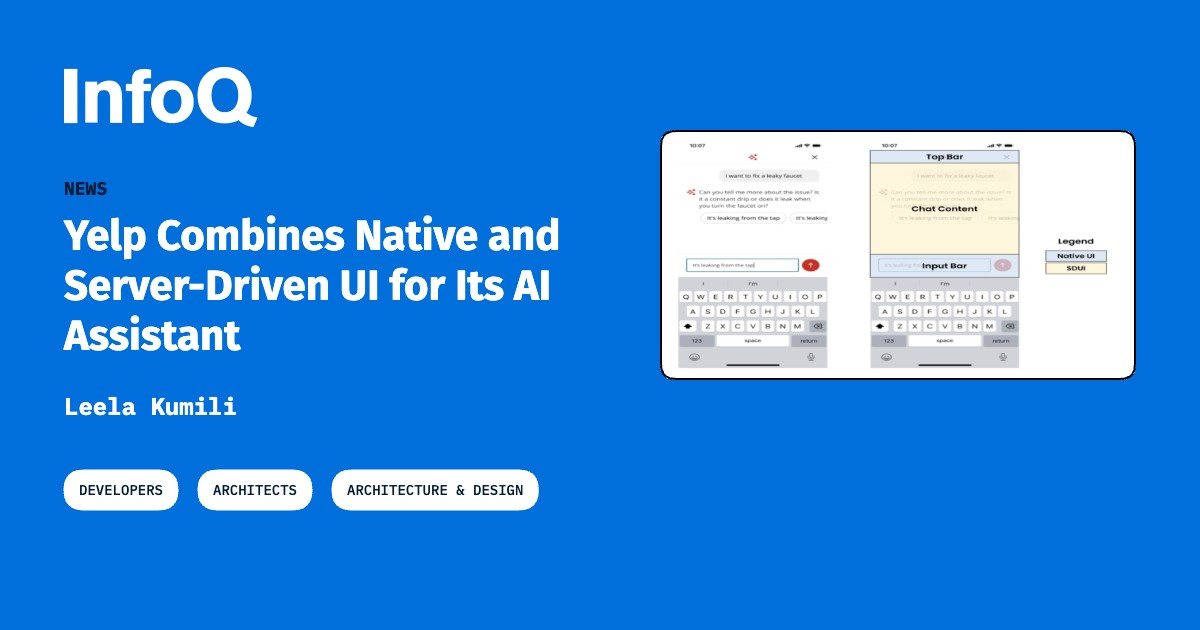
The runtime implementation functions by cleanly decoupling view configuration from conversation data events. When a user opens a chat session, the mobile client fetches the initial CHAOS configuration and initializes an independent dataset dedicated to message events. Subsequent interactions and updates stream into this existing view hierarchy as events without triggering an expensive re-fetch of the overall view configuration, minimizing network overhead and avoiding visual flickering during rapid exchanges.
These events govern persistent user and bot text, temporary typing indicators, quick reply chips, and external destination links. In addition, the backend emits actionable commands that control the client interface directly during the conversation lifecycle. For example, once a project request is finalized, the backend can simultaneously return a confirmation message, a link to view matching service professionals, and an action signal that disables the native chat input field. The client handles optimistic message rendering, triggers automatic retries on recoverable errors, and locks the input with an error prompt if a non-recoverable failure occurs.
Advertisement
Tech Pulse Daily
Get tomorrow's pulse first
Join engineers who read Tech Pulse before stand-up. Free, weekday mornings.
Yelp Combines Native and Server-Driven UI: why it matters
Decoupling conversation logic from presentation code allows product teams to alter layouts, introduce new card structures, and adjust workflow steps on the server side instantly across iOS, Android, and web clients. This addresses a major bottleneck in mobile development where every minor interface iteration or prompt experiment normally demands separate client implementations, regression testing, and mobile app store review cycles.
The approach parallels architectural patterns seen elsewhere in the industry, such as Airbnb’s Ghost Platform, which relies on server-defined UI across web and mobile surfaces. Both designs eliminate the friction of synchronized multi-platform releases for interface adjustments. However, Yelp’s specific implementation applies this paradigm to conversational workflows, demonstrating that teams can preserve smooth client-side input states, gestures, and error handling while delegating message layout and conversational state progression entirely to backend systems.
Yelp Combines Native and Server-Driven UI: who is affected
The architecture directly affects Yelp’s mobile and backend engineering teams by altering their daily development and collaboration workflows. While separating view configuration from conversation datasets permits parallel feature development across frontend and backend groups, Yelp engineers acknowledged that the setup creates distinct cross-platform coordination challenges. Engineers required dedicated ramp-up time to master both the Assistant codebase and the CHAOS framework specifications.
Furthermore, shared server-driven implementations can still display subtle behavioral discrepancies between iOS and Android runtimes. Despite these cross-platform coordination costs, the architecture delivered immediate modularity gains for engineering. The team was able to reuse the Android Assistant codebase directly to launch the Biz Ask Anything pilot, proving that the underlying event-driven rendering pipeline could power secondary conversational products with minimal client-side engineering overhead.
Yelp Combines Native and Server-Driven UI: what to watch
Looking ahead, Yelp is using this hybrid framework as the baseline for its next-generation Assistant infrastructure. The primary engineering focus is tightening the connection between unstructured business information and structured, transactional user actions like bookings, appointments, and orders. By continuing to manage conversation flows and UI controls through server events, Yelp can expand action types and partner integrations without modifying client code.
Teams tracking server-driven architectures should monitor how Yelp manages ongoing cross-platform parity between iOS, Android, and web clients as the Assistant’s interactive features grow more complex. Key areas of observation include how the team handles offline resilience, complex interactive widgets within the CHAOS conversation stream, and whether Yelp eventually migrates text input fields and client network orchestration directly into the core CHAOS framework itself.
Developer Action Items
- ☐ Verify the claim on the official Framework / iOS / Android page (or InfoQ), not from this recap alone.
- ☐ Name the surface that moved — API, policy, model, hardware, or commercial terms — before you Slack the thread.
- ☐ Assign one owner a day to read the primary material and decide: this-sprint, this-quarter, or noise.
- ☐ Do not change production on day-one coverage. Watch the vendor changelog and one independent write-up first.
Yelp Combines Native and Server-Driven UI FAQ
What is Yelp CHAOS?
CHAOS stands for Content Hosting Architecture with Optimization Strategies, Yelp’s cross-platform server-driven UI framework supporting web, iOS, and Android.
Why did Yelp choose a hybrid UI model instead of pure server-driven UI?
The CHAOS framework lacked native text input fields and network request capabilities, so extending it would have delayed delivery; keeping input and navigation native avoided delays.
How does the Yelp Assistant handle client-side communication errors?
The client displays submitted messages and typing indicators, attempts automatic retries for recoverable errors, and disables message input while prompting the user to try again if a non-recoverable failure occurs.
What other internal Yelp project reused the Assistant architecture?
Yelp reused the Android Assistant implementation to launch its Biz Ask Anything pilot.
Sources

Author
Dillip Chowdary
Writes Tech Bytes coverage of AI, engineering, and the tools that actually ship. Editor of Tech Pulse Daily.
Related on Tech Bytes
Advertisement